
Portrait vs. Landscape Digital Signage: Which Is Better?
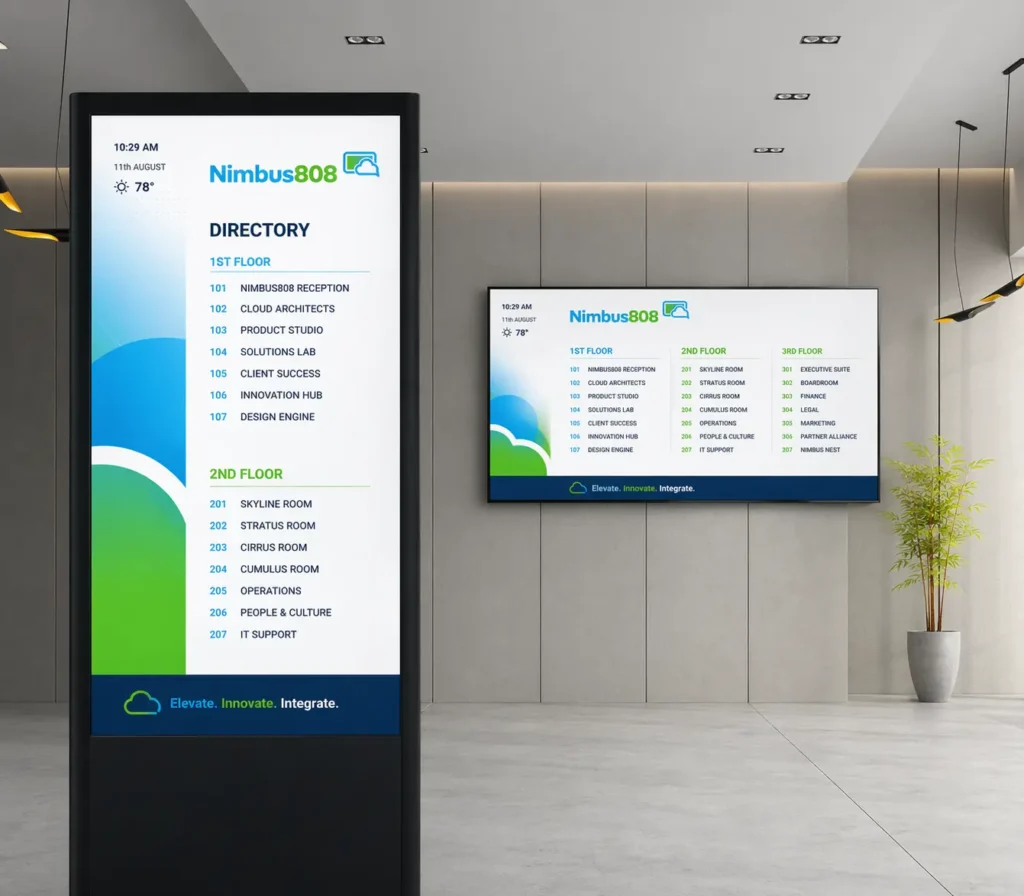
After you’ve picked the screen and its location, there’s a key decision that impacts its effectiveness:
Should your digital signage be horizontal (landscape) or vertical (portrait)? Landscape matches most TVs and monitors. It’s ideal for menu boards, dashboards, announcements, and widescreen content. Portrait is more like a digital poster or smartphone, perfect for retail promotions, directories, wayfinding, vertical menus, social content, or narrow spaces. One format isn’t always better than the other. The best choice depends on the job.
Consider three main factors:
- Content: Widescreen video and directories need different layouts.
- Location: Wide walls suit landscape; narrow spaces suit portrait.
- Viewing: Will people watch from afar, walk by, or interact up close?
Orientation is part of your content strategy, not just hardware setup. A well-chosen orientation makes your message clear, intentional, and easy to understand. The wrong one makes content feel cramped or awkward. So, before you rotate the screen, ask a better question:
Which orientation makes your message easiest for your audience to see and understand?
This guide will help you decide.
What Is Landscape Digital Signage?

Landscape digital signage is wider than it is tall. Think of the TV in your living room, a movie screen, or your laptop. Most modern landscape displays use a 16:9 aspect ratio, which also happens to be the standard format for a huge amount of video and television content. That familiarity is one of landscape’s biggest advantages.
Put a TV on a wall, connect a digital signage player, and much of your existing content will already fit naturally.
Landscape is especially useful when you want to show:
- Videos
- Multiple menu items
- Presentations
- Dashboards
- Announcements
- Wide photography
- Several pieces of information at once
For many small businesses, landscape is the easiest place to start because the TV they already own is probably sitting in landscape orientation.
What Is Portrait Digital Signage?

Portrait digital signage is taller than it is wide. Take a standard 16:9 display, rotate it 90 degrees, and you essentially have a 9:16 portrait display. Think of a movie poster, restaurant sign, store advertisement, or the smartphone in your hand.
That’s why portrait signage immediately feels different. Instead of looking like another television on the wall, it can feel more like a digital poster. Carousel specifically highlights this advantage, noting that portrait displays can work particularly well for lists, menus, and directory information.
Portrait can be particularly effective for:
- Retail promotions
- Product advertisements
- Directories
- Wayfinding
- Interactive kiosks
- Vertical menus
- Event schedules
- Social media content
- Narrow walls and columns
And because people spend so much time viewing vertical content on smartphones, portrait-format content has become increasingly familiar.
Portrait vs. Landscape Digital Signage at a Glance
| Landscape | Portrait | |
|---|---|---|
| Shape | Wide | Tall |
| Common Ratio | 16:9 | 9:16 |
| Feels Like | TV / presentation | Poster / smartphone |
| Video | Excellent | Best with vertical video |
| Menu Boards | Excellent | Excellent for vertical lists |
| Social Content | Good | Excellent |
| Retail Promotions | Good | Excellent |
| Dashboards | Excellent | Depends on layout |
| Directories | Good | Excellent |
| Narrow Spaces | Limited | Excellent |
| Wide Walls | Excellent | Good |
| Existing TVs | Easiest | May require remounting |
The biggest takeaway?
Choose the orientation around the content and space, not simply because one looks more modern.
When Landscape Digital Signage Works Best

Landscape is popular for a reason. It gives you plenty of horizontal space, accommodates standard video well, and allows multiple pieces of information to appear side by side.
Think of a restaurant menu board.
You may want:
BURGERS | SIDES | DRINKS | SPECIALS
A landscape display gives those categories room to breathe. Or imagine a waiting room screen. One side might display an announcement while another shows today’s information, images, or other content. Landscape gives you room to create those broader layouts.
Landscape is a strong choice for:
- Restaurants and cafés
Wide menus can show several categories simultaneously. - Waiting rooms
Videos, announcements, and educational content naturally fit traditional TV proportions. - Corporate offices
Presentations, dashboards, employee communications, and video are usually designed horizontally. - Schools and churches
Announcements, calendars, presentations, and videos work naturally on landscape displays. - Bars and entertainment venues
Landscape makes sense when video is a major part of the experience.
If you’re starting with a regular TV and don’t have a specific reason to rotate it, landscape is usually the simplest option.
When Portrait Digital Signage Works Best

Portrait becomes interesting when the screen needs to behave less like a TV and more like a sign. Imagine walking into a clothing store. A horizontal TV mounted next to a mannequin may feel like a screen. Turn that same display vertically and show a full-length model wearing the latest collection, and suddenly it feels like part of the retail experience.
That’s the power of portrait.
Portrait is particularly useful for:
- Retail stores
Show full-length products, promotions, new arrivals, QR codes, and vertical campaign creative. - Directories and wayfinding
Long lists of businesses, rooms, floors, or destinations naturally flow from top to bottom. - Interactive kiosks
Portrait layouts can work naturally for touch-based browsing and vertical lists. - Restaurants
A vertical display can work well for a focused menu, daily specials, or promotional signage. - Hotels and event venues
Schedules, meeting-room information, directories, and welcome messages fit well vertically. - Narrow spaces
Columns, hallways, store entrances, and areas between doors may not have enough width for a large landscape display.
Portrait gives businesses another advantage: It can create a large visual presence without requiring a wide wall.
Start With Your Content
Before you decide how to mount your screen, ask one question:
What am I actually going to put on it?
This can save you a lot of trouble later. Carousel recommends determining the intended content before hanging the display because orientation directly affects how that content will fit.
If most of your content is:
- YouTube-style video
- Widescreen promotional videos
- Presentations
- Multiple menu columns
- Dashboards
- Wide photography
Landscape probably makes more sense.
If your content is primarily:
- Vertical promotions
- Lists
- Directories
- Full-length product photography
- Mobile-first content
- Vertical social videos
- QR-code promotions
Portrait deserves serious consideration. Don’t design the content and then force it onto the screen.
Whenever possible: Choose the screen orientation first, then design your content specifically for that space.
Think About Your Physical Space
Sometimes the room makes the decision for you. Imagine you have a narrow wall between two windows. A 55-inch landscape TV may not fit. Rotate the display vertically, and suddenly you can use that space.
Portrait signage can be particularly useful in:
- Storefront windows
- Building columns
- Hallways
- Elevator areas
- Retail aisles
- Entranceways
- Checkout areas
Landscape works particularly well across:
- Wide walls
- Above counters
- Conference rooms
- Reception areas
- Waiting rooms
- Large open spaces
This is why you shouldn’t shop for a display before thinking about placement.
Start with the wall. Measure the available space. Look at where customers will stand. Then choose the screen.
Think About How People Will See It

Orientation isn’t just about the wall. It’s also about the person standing in front of it.
Imagine two customers. One is sitting 12 feet away in a dental waiting room. The other is standing two feet from a touchscreen directory. They’re using digital signage in completely different ways.
- The waiting-room audience is viewing the screen more like a television. A landscape display makes sense.
- The directory user is actively reading and navigating information. A tall portrait layout may be easier to organize.
- Distance also matters. Larger text and screens become increasingly important as viewing distance increases.
So ask:
- Are people walking past?
- Standing directly in front of it?
- Sitting across the room?
- Reading detailed information?
- Watching video?
The orientation should support the way people naturally encounter the screen.
What About Digital Menu Boards?

Here’s where the answer becomes: It depends on the menu.
A restaurant with a large menu might benefit from landscape displays because multiple categories can appear side by side.
For example:
COFFEE | TEA | FOOD | SPECIALS
But imagine a smaller café with only eight drinks.
A portrait screen behind the counter could create a clean vertical menu:
ESPRESSO
AMERICANO
LATTE
CAPPUCCINO
MOCHA
Both work.
The better orientation is the one that makes the menu easiest to scan quickly. That’s more important than whether the TV is horizontal or vertical.
What About Video and Social Media?

This is where your existing content library matters.
Traditional video is generally created in 16:9 landscape format. That makes landscape signage the natural choice for most standard video. Carousel similarly identifies landscape as a strong fit when displaying video.
Put that same video on a portrait screen and you’ll usually have to:
Crop it, resize it, redesign the layout, or leave unused space around it. But social media has changed the equation. TikTok, Instagram Reels, YouTube Shorts, and other mobile-first platforms have made 9:16 vertical video extremely common.
If your business already creates vertical social content, portrait digital signage gives you an interesting opportunity:
One piece of content can potentially work across your social channels and your in-store screens with fewer layout changes.
For a small business with limited time and creative resources, that’s worth considering.
Can You Use Both Portrait and Landscape?
Absolutely.
In fact, businesses with several screens don’t necessarily need to choose one orientation for the entire location.
Imagine a retail store. A large landscape screen behind the checkout counter shows campaign videos and promotions. A portrait display near the entrance highlights today’s sale.
Another portrait screen farther inside displays product information or a QR code. Each screen has a different job.
And that’s the point.
Your screens don’t have to match. Their purpose does. If your digital signage platform supports both orientations, you can create layouts specifically for each screen.
What If You Already Have a TV?
This is where we’d keep things simple. If you already have a TV mounted horizontally and it works for the content you want to display, USE IT.
Don’t rotate a perfectly good screen simply because portrait signage looks newer or more eye-catching. There may also be practical considerations. Not every consumer TV is designed or warranted to operate vertically, so check the manufacturer’s mounting and ventilation guidance before rotating a display.
If you’re starting from scratch, then you have more freedom.
Think about:
Content → Space → Audience → Orientation
In that order.
The goal isn’t to create the coolest-looking installation. It’s to make your message easier to see and understand.

Which Orientation Should You Choose?
There’s no winner in the portrait vs. landscape debate.
There’s simply a better fit for the job.
Choose Landscape If:
- You’re using an existing horizontally mounted TV.
- You primarily show standard videos.
- You need multiple pieces of information side by side.
- You’re building menu boards across a wide wall.
- People will view the screen from across a room.
- Your existing creative is primarily 16:9.
Choose Portrait If:
- You want the screen to feel like a digital poster.
- You’re working with a narrow wall or limited horizontal space.
- You’re displaying directories, lists, or wayfinding information.
- Customers will stand close to the display.
- You create a lot of vertical or mobile-first content.
- You’re building a kiosk or retail promotional display.
And if both work? Choose whichever makes your content easier to understand. That’s really what matters.
So, Portrait or Landscape?

Don’t start with the orientation.
Start with the purpose.
Ask yourself:
What do I want someone to see, understand, or do when they look at this screen?
Then look at your space and the content you already have.
If your existing TV works horizontally, use it. If a narrow wall, vertical promotion, directory, or mobile-style experience calls for portrait, turn the idea on its side. And if your business needs both, use both.
The best orientation is simply the one that makes your message easiest to see.
