
What Can You Display on Digital Signage? 25 Ideas for Small Businesses
One of the biggest questions small business owners ask is:
“What should I actually put on my digital signage?”
The answer is almost anything. Digital signage isn’t just for advertising. It can promote products, share company updates, display menus, welcome visitors, recognize employees, communicate safety information, and much more.
Whether you own a restaurant, retail store, office, healthcare clinic, manufacturing facility, church, or gym, your screens can become one of your most effective communication tools.
Here are 25 practical digital signage ideas you can start using today.

1. Sales and Promotions
Highlight discounts, seasonal offers, limited-time deals, and featured products.
- Retail
- Restaurants
- Salons
- Grocery stores
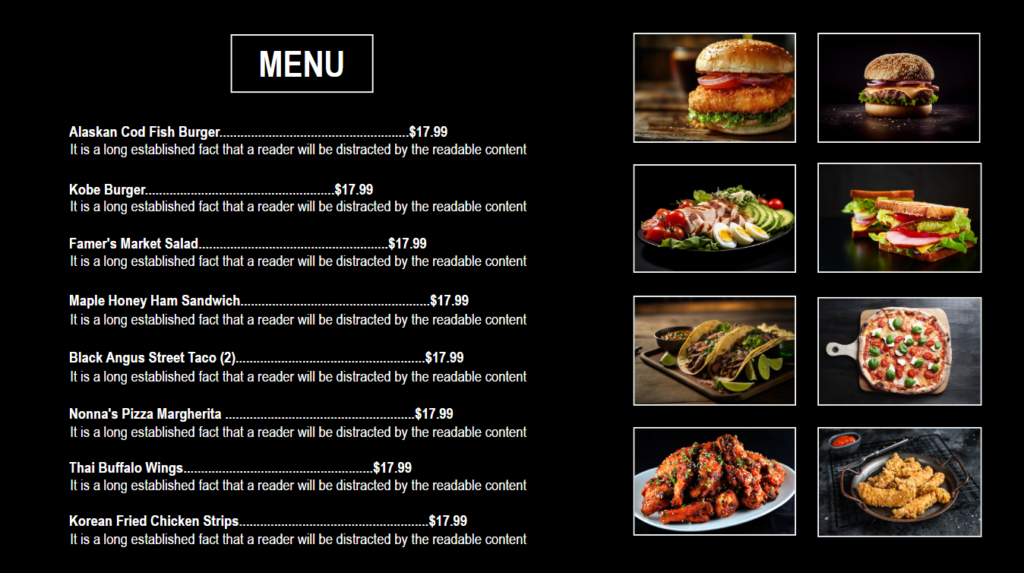
2. Digital Menu Boards
Display menus that are easy to update without printing new signs.
- Restaurants
- Cafés
- Bars
- Food trucks

3. New Product Launches
Introduce new products with images, videos, and pricing.
4. Featured Products
Draw attention to best sellers or high-margin products.


5. Daily Specials
Keep customers informed about today’s offers.
6. Upcoming Events
Promote community events, workshops, sales, or special nights.


7. Business Hours
Display store hours, holiday schedules, and temporary closures.
8. Welcome Messages
Create a warm first impression with personalized greetings.
- Offices
- Hotels
- Healthcare
- Churches


9. Company Announcements
Share important business news with customers or employees.
10. Employee Recognition
Celebrate birthdays, work anniversaries, achievements, and new hires. Employee recognition is a recurring recommendation in digital signage best practices because it supports engagement and workplace culture.


11. Safety Reminders
Display workplace safety messages, PPE reminders, emergency procedures, and compliance notices.
- Manufacturing
- Warehouses
- Construction
12. Shift Schedules
Help employees stay informed with shift updates and department notices.


13. Training Reminders
Promote upcoming training sessions or onboarding information.
14. HR Updates
Display benefits reminders, policy changes, and important deadlines.


15. Customer Testimonials
Build trust by sharing positive customer reviews.
16. Social Media Posts
Highlight your latest Instagram, Facebook, or LinkedIn content.


17. Community News
Share local events or community involvement.
18. Holiday Greetings
Celebrate holidays and seasonal events.


19. Weather Information
Display today’s weather alongside your promotions or announcements.
20. QR Codes
Link customers to:
- Menus
- Loyalty programs
- Online ordering
- Surveys
- Event registration


21. Waiting Room Information
Highlight discounts, seasonal offers, limited-time deals, and featured products.
- Retail
- Restaurants
- Salons
- Grocery stores
22. Wayfinding
Help visitors find offices, meeting rooms, departments, or event locations.


23. Frequently Asked Questions
Answer common customer questions before they’re asked.
24. Emergency Notifications
Communicate important alerts or facility information when needed.


25. Brand Story
Tell customers who you are, what you do, and why your business is different.
Tips for Creating Great Digital Signage Content
The best digital signage isn’t filled with lots of text.
Instead, remember these simple guidelines:
- Keep messages short.
- Use large, readable fonts.
- Include high-quality images.
- Rotate content regularly.
- Keep branding consistent.
- Show content that matters to the audience in that location.
Your digital signage is more than just a screen; it’s one of the most effective ways to connect with customers, employees, and visitors. Whether you’re highlighting today’s special, welcoming guests, recognizing achievements, or sharing important announcements, compelling content keeps your screens both useful and engaging.
Begin with a few simple ideas, update them consistently, and customize your content for your audience. With cloud-based digital signage software like Nimbus808, you can control every screen from one platform and keep your messaging fresh- no need for printed signs or manual updates.
